After testing the top Amazon-to-Shopify import tools, here's what actually works — and which app saves you the most time in 2026.
If you've ever tried to manually copy product data from Amazon to Shopify, you already know how tedious it is.
You're copying titles, reformatting descriptions, downloading images one-by-one, re-entering prices, and doing all of this for every single product. Then you rebuild trust from scratch because there are no reviews.
For Amazon affiliates and dropshippers, the right Shopify Amazon importer app eliminates all of that friction. The challenge is knowing which app actually delivers — and which ones create more work than they save.
After testing multiple Shopify apps for Amazon product importing, we've narrowed it down to the three worth your attention in 2026. Here's what each one does well, where they fall short, and who they're really built for.
A side-by-side look at the key features that matter for affiliate and dropshipping stores.
| App | 1-Click Import | Review Importer | AI SEO Content | Auto Fulfillment | Bulk Import | Best For |
|---|---|---|---|---|---|---|
| 1FX Amazon Importer | ✓ Yes | ✓ Yes | ✓ Yes | ◑ Partial | ✓ Yes | Affiliates & dropshippers |
| 2GD: Amazon Importer | ✓ Via URL | ✗ No | ✗ No | ✗ No | ◑ Limited | Small catalog builders |
| 3Reputon Amazon Importer | ✓ Yes | ✗ No | ✗ No | ✗ No | ✓ Yes | Affiliate-only stores |
Detailed breakdowns of each app, including real-world usage observations, feature depth, and honest limitations.

1-click Amazon product & review importer with AI SEO content generation
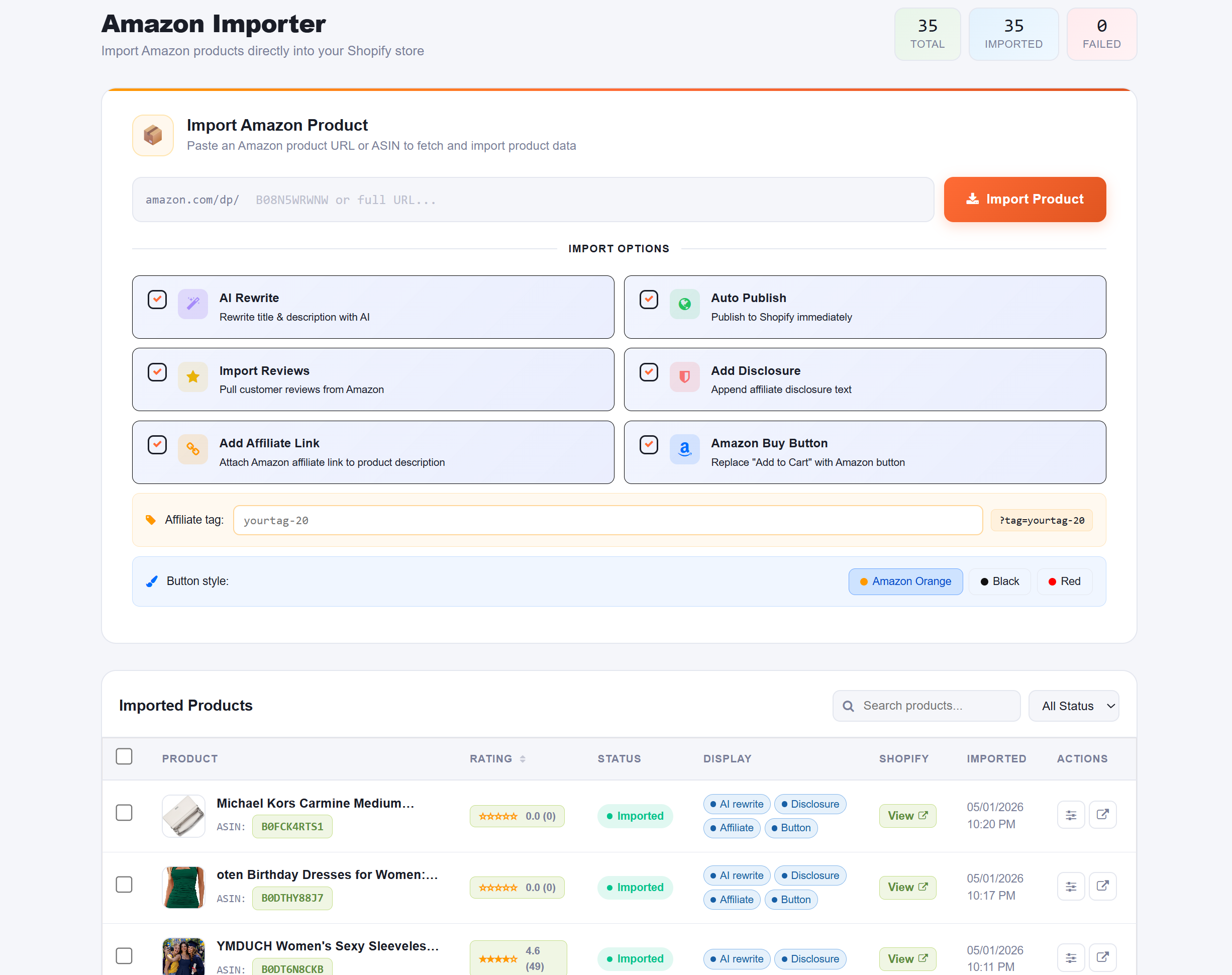
FX Amazon Importer is the most complete Shopify Amazon importer app we tested. It's built specifically for Amazon affiliates and dropshippers who want speed, quality, and SEO value from a single tool.
What separates it from the competition is the combination of three capabilities that most tools treat as separate problems: product importing, review importing, and AI-generated content. In real-world usage, having all three in one place dramatically reduces setup time per product.

URL-based Amazon product importer with automatic currency conversion
GD: Amazon Importer takes a simpler approach. You paste an Amazon product URL, and it pulls the title, images, price, and variations into your Shopify store. It's a functional tool for merchants who need basic importing without a lot of extras.
The automatic currency conversion feature is useful for international stores — it updates daily, which reduces pricing errors in cross-border setups. From an operational perspective, though, the lack of review importing and SEO content generation means you're still doing a lot of work manually after the import.

Bulk Amazon product importer focused on affiliate commission stores
Reputon Amazon Importer focuses on the affiliate side of the equation. It lets store owners bulk-import Amazon products, add an Amazon Affiliate buy button, and earn commissions when customers click through and purchase on Amazon.
The recently added price auto-sync and import-by-seller features are improvements worth noting. That said, like the others in this tier, there's no automated fulfillment, and SEO tools are not part of the package — which limits how well imported listings will rank organically.
After testing multiple Shopify apps side-by-side, the gap between FX Amazon Importer and the rest comes down to three areas where it's simply doing more work for you.
Every imported product gets a unique, SEO-friendly description generated by AI. This avoids duplicate content penalties and gives your listings a genuine shot at ranking in Google search — something no other tool on this list offers natively.
Star ratings and customer reviews from Amazon are imported directly to your store. New visitors see verified social proof immediately — without waiting months to accumulate your own reviews. In real-world usage, this measurably improves conversion rates.
The entire import process — product data, images, descriptions, reviews — happens in a single action. For a store scaling to hundreds of products, this isn't a convenience, it's a business necessity.
Manual product importing takes 15–30 minutes per product when you account for descriptions, images, and reviews. FX Amazon Importer reduces this to under a minute. At scale, that's the difference between a part-time side project and a real business operation.
Not every store has the same needs. Here's a practical framework for making the right decision.
General rule: If you're building a store with more than a handful of products and care about long-term SEO, FX Amazon Importer is the most complete single-tool solution. If you need basic imports for a small catalog, GD or Reputon are simpler entry points. [Insert internal link to dropshipping guide]
Before setting up your store, it's worth understanding the key differences and where the legal lines are drawn.
This is the cleanest, lowest-risk model. You import product listings to your Shopify store and earn a commission when customers click through and buy on Amazon. You never hold inventory, you never process orders, and you operate entirely within Amazon's Terms of Service — provided you're an approved Amazon Associate.
This model is more complex. You list Amazon products on your Shopify store at a markup, and when a customer purchases, you order from Amazon and ship to them. Amazon's dropshipping policy permits this only if you are the seller of record. Purchasing from Amazon retail and reselling is generally prohibited.
Both models are served by Shopify Amazon importer apps. The affiliate model is lower-risk for new store owners.
Here's the general workflow for getting Amazon products into your Shopify store, using FX Amazon Importer as the example (it's the most straightforward method).
If you're running an affiliate store, apply for the Amazon Associates program first. Approval typically takes a few days and requires an active website with content. You'll need your affiliate tracking IDs for product links.
Go to the Shopify App Store and install FX Amazon Importer. Connect it to your Shopify store and complete the initial setup. The process takes under five minutes.
Browse Amazon for the product you want to import. Copy the product URL or ASIN. Focus on products with strong reviews, high star ratings, and solid demand indicators.
Paste the product URL or ASIN into FX Amazon Importer. Click import. The app pulls product data, images, and reviews in seconds. The AI tool generates a unique, SEO-optimized product description automatically.
Quickly scan the imported product listing. Adjust pricing if needed, check the AI-generated description, and verify the reviews imported correctly. Publish to your store. [Insert internal link to Shopify product optimization guide]
With products live and SEO content in place, focus on traffic — SEO, social media, or paid ads. The imported reviews and AI descriptions give you a head start on both trust and search visibility from day one.
Most new stores make the same set of avoidable errors. Here's what to watch for.
Duplicate content from Amazon will hurt your SEO rankings. Google penalizes identical copy across multiple sites. Use AI-generated descriptions (like those FX Amazon Importer creates) to make each listing unique.
Not all Amazon products can be imported and resold. Violating Amazon's policies can get your affiliate account suspended. Always verify product rights before listing.
Launching with zero reviews on a new store is a conversion killer. Visitors have no reason to trust you. Importing Amazon reviews immediately gives your store social proof — don't skip this step.
Dropshipping and affiliate marketing have very different risk profiles, margins, and operational requirements. Understand both before committing. [Insert internal link to business model comparison guide]
For dropshippers, margins on Amazon products can be thin. Factor in Shopify fees, payment processing, and potential returns before setting your retail price. Many new stores underprice and lose money on every sale.
The most common questions about Amazon importing for Shopify, answered clearly.
It depends on your setup. Amazon's dropshipping policy allows it only if you are the seller of record and make clear you're responsible for returns and customer service. Simply buying products from Amazon retail and reselling them without authorization is not permitted and risks account suspension. The safest model for most new store owners is the Amazon Associates (affiliate) program, where you earn commissions on referred sales without handling inventory at all. Always review Amazon's current policies and consult a legal professional if you're uncertain about your specific situation.
Based on our testing, FX Amazon Importer is the most capable option for both affiliates and dropshippers in 2026. It's the only app that combines 1-click product importing, Amazon review syncing, and AI-generated SEO descriptions in a single tool. For stores that only need basic URL-based importing, GD: Amazon Importer is a functional alternative. For pure affiliate commission stores with large catalogs, Reputon is worth considering due to its bulk import and unlimited product features.
Yes, to a meaningful extent. FX Amazon Importer automates the import process itself — pulling product data, images, and reviews with a single click, plus generating SEO content automatically. What's not fully automated across any of these apps is order fulfillment: when a customer purchases, you still need to manage that order manually or through a separate fulfillment system. Full end-to-end automation (including order fulfillment) is not a feature of any Amazon importer app currently on Shopify.
For affiliate-model stores, yes — you need an approved Amazon Associates account to generate affiliate links and earn commissions on referred sales. Without one, you can still import product data, but you won't have compliant affiliate tracking. For dropshipping models, an affiliate account isn't required, but you need to ensure you have the rights to import and sell the products. FX Amazon Importer works with both models and is designed to integrate with your Amazon Associates setup where applicable.
In practice, yes — significantly. Numerous eCommerce studies show that product reviews are one of the highest-impact trust signals on a product page. New Shopify stores with no reviews face an immediate credibility gap. By importing real Amazon reviews and star ratings via FX Amazon Importer, you give first-time visitors the social proof they need to make a purchase decision. This is particularly valuable in the early stages of a store before you've accumulated your own customer reviews.
FX Amazon Importer & Affiliate is a Shopify app built by FX Commerce to help online merchants, dropshippers, and Amazon affiliates grow their business faster.
Our mission is simple: eliminate the manual, time-consuming work of building a product catalog — and replace it with a single click. We believe every entrepreneur deserves powerful tools that are also beautifully simple to use.
With FX Amazon Importer you can sync Amazon products, real customer reviews, high-resolution images, and AI-generated SEO descriptions to your Shopify store in seconds — not hours.
🌏 Built for global sellers · 💬 Support in English · 🚀 Actively developed
Last updated: January 2025
FX Commerce ("we", "our", "us") operates the FX Amazon Importer Shopify application. This policy explains how we collect, use, and protect your information.
We collect information you provide when installing the app (Shopify store URL, email address) and usage data such as which products you import. We do not collect or store your customers' personal data.
We use collected data solely to operate and improve the app, provide customer support, and send optional product updates. We never sell your data to third parties.
Product data is fetched from Amazon's public listings via authorized methods. We comply with Amazon's Associates Program Operating Agreement and Terms of Service.
All data is transmitted over HTTPS. We apply industry-standard security practices to protect your information.
For privacy inquiries, email us at fxcommerce247@gmail.com.
We'd love to hear from you — whether it's a question, feature request, bug report, or just a hello. Our team typically responds within 24 hours.